 2010年3月15日
默认的Google.com搜索会经常访问失败,尝试改成访问正常的Google.cn,但在搜索栏的“查找更多提供程序”页面里又没有Google.cn搜索。
其实可以通过修改注册表的方式把默认的Google.com改成Google.cn,或添加一个Google.cn搜索。
在运行里输入regedit,回车,打开注册表编辑程序;
浏览到HKEY_CURRENT_USER\Software\Microsoft\Internet Explorer\SearchScopes\,里面每个子项就是一个搜索提供程序;
找到一个DisplayName为Google的,这就是默认的Google.com搜索,下面我们把它改成Google.cn搜索:
将URL的值改为:
http://www.google.cn/search?hl=zh-CN&q={searchTerms}&meta=&aq=f&oq=
确定后关闭注册表编辑程序,重启IE8,默认的Google.com搜索就变成Google.cn搜索了,Hooray
2010年3月8日
这个有可能是注册表访问失败造成的。
解决办法:
1. 打开C:\WINDOWS\setupapi.log,在最底下(最新的信息)应该可以看到驱动安装时访问某个注册表项失败。
例如: 在我这里是HKCR/CLSID/{*****}
2. 运行regedit,打开注册表编辑,选中相应的注册表项,右键单击选择“权限”,在弹出的对话框里赋予当前用户或Everyone “完全控制”的权限。
例如:展开HKEY_CLASSES_ROOT,浏览到CLSID项,右键单击选择“权限”,选择Everyone,在下面的“完全控制”里勾选“允许”,单击确定完成修改。
3. 重新安装或更新驱动程序,应该就ok了 : )
2010年2月26日
Example: The steps to delete QSAMPLE library
××××××××××××××××××××××××××××××××××××××××××××××××××××××××××××××××
1# Use the Work with System Value (WRKSYSVAL) command to remove QSAMPLE from the system value(QUSERLIBL or QSYSLIBL) it is contained in. (The changed system value does not affect the library list of any jobs running.)
1. Enter WRKSYSVAL QUSRLIBL at the i5/OS command line.
2. Press Enter and select option number 2.
3. Remove the QSAMPLE library from the list.
2# Use the Remove Library List Entry (RMVLIBLE) command to remove QSAMPLE from the job's library list.
1. Enter RMVLIBLE QSAMPLE at the i5/OS command line.
3# Use the Work with Object Lock (WRKOBJLCK) command to remove locks on QSAMPLE library if any.
1. Enter WRKOBJLCK OBJ(QSYS/QSAMPLE) OBJTYPE(*LIB) at the i5/OS command line.
2. Remove object locks on QSAMPLE library.
4# Use the Delete Library (DLTLIB) command to delete the library and the objects in the library.
1. Enter DLTLIB QSAMPLE at the i5/OS command line.
××××××××××××××××××××××××××××××××××××××××××××××××××××××××××××××××
The information are mainly refered from IBM infocenter for iSeries.
2009年8月2日
今天发现两个google和百度找不到的知识点,赶紧记下来,是切身体会呢^-^
1. 有的人光线暗的时候照相总是红眼,旁边的人却没有。 这个在百度和google上都找不到原因。不过我现在知道了,是因为这个人眼睛比其他人大,大眼睛的人晚上照相时肯定红眼的,嘿嘿
2. 我的Windows 7 Beta居然可以一直用。你看,我笔记本这半年时间还没自动重启或不能使用。。。
2009年7月17日
1、修改/etc/default/locale, 改为:
LANG="en_US.UTF-8"
LANGUAGE="en_US:en"
2、sudo reboot
3、locale
显示环境变量已经全部是英文
上述程式已在Ubuntu 9.04亲测。
转载自:R08的博客大巴空间
转载源:http://round08.blogbus.com/logs/21832677.html
如果想 Ubuntu 在每次啟動到 command prompt ,可以輸入以下指令:
$echo “false” | sudo tee /etc/X11/default-display-manager
當下次開機時,就會以指令模式啟動,如果想變回啟動 x window,可以輸入:
$echo “/usr/sbin/gdm” | sudo tee /etc/X11/default-display-manager
P.S. 如果不是用 gdm 作為,以上指令需要根據你的環境作出更改,例如 kdm 或 xdm。
上述程式已在Ubuntu 9.04亲测。
转载自:
 chinaitlab社区
佚名

2008-9-9

转载源:http://linux.chinaitlab.com/administer/763020.html
2008年6月22日
Firefox在Linux下的后退按键是“Alt"+"<-",要同时按两个键,不如Windows下的Backspace一次按键方便。
要启用Backspace,只需将about:config里的“browser.backspace_action”由默认的2改为0
2008年6月20日
编辑工程的.project文件:
添加
<nature>org.eclipse.wst.common.project.facet.core.nature</nature>
<nature>org.eclipse.wst.common.modulecore.ModuleCoreNature</nature>
<nature>org.eclipse.jem.workbench.JavaEMFNature</nature>
到
<natures>
…
</natures>
eg.
例如将
<natures>
<nature>org.eclipse.jdt.core.javanature</nature>
</natures>
更改为:
<natures>
<nature>org.eclipse.wst.common.project.facet.core.nature</nature>
<nature>org.eclipse.wst.common.modulecore.ModuleCoreNature</nature>
<nature>org.eclipse.jem.workbench.JavaEMFNature</nature>
<nature>org.eclipse.jdt.core.javanature</nature>
</natures>
2008年5月22日
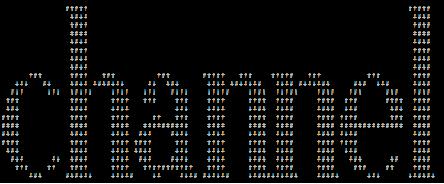
应用python的pickle模块从序列化文件中构造对象,根据对象的构造解开谜题
详细描述 :
http://www.pythonchallenge.com/pc/def/peak.html
(peak hell连读发音类似pickle,谜题就是pickle模块的应用了)
解决方案代码:
import pprint,pickle,sys
pfile = open('banner.p')
data = pickle.load(pfile)
for row in data:
for item in row:
for index in range(item[1]):
sys.stdout.write(item[0])
print ''
pfile.close()
输出的对象构造:
2008年5月16日
在网上找了很久才找到developerWorks上的一个解决方案:
在命令提示符里切换到目录“C:\Program Files\IBM\SDP70\jdk\jre\bin”,运行“java.exe -Xshareclasses:destroyAll”
这样就能正常启动RAD了!
原因描述如下:
(摘录自http://www-1.ibm.com/support/docview.wss?uid=swg21281393,并通过Google Translate转译,译文已作修改)
×××××××××××××××××××××××××××××××××××××
问题(摘要)
此说明解释如何解决错误“JVM的终止。退出代码= 1”。
起因
RAD自带的IBM JVM使用了一个高速缓存参数来提高性能。而因为JVM的崩溃,比如蓝屏,或断电,都可能造成Java高速缓存被损坏。 而JVM会拒绝连接到一个损坏的高速缓存。
解决问题
要解决这个问题,使用“-Xshareclasses:destroyAll”的Java选项将销毁所有的共享级缓存。这是一种实用工具选项,所以不会启动JVM 。如果您想要这么做,只要从命令提示符使用参数“-Xshareclasses:destroyAll”来运行RAD使用的java。
××××××××××××××××××××××××××××××××××××××
2008年5月9日
Follow the URL chain to get the result (the chain may contain over 300 URLs......)
谜题详细描述:http://www.pythonchallenge.com/pc/def/linkedlist.php
Python解决方案:
import urllib
nothing = "12345"
ii = 1
while ii<401:
source = urllib.urlopen("http://www.pythonchallenge.com"
+ "/pc/def/linkedlist.php?nothing="+nothing).read()
nothing=filter(str.isdigit, source)
print nothing
if source != "and the next nothing is " + nothing:
print "source is not: and the next nothing is " + nothing
print "source is: " + source
nothing = raw_input("select which number?")
print "you set " + nothing + " as nothing"
ii+=1
2008年5月8日
从一大堆字母里找出两边都刚好有3个大写字母的小写字母
详细描述:
http://www.pythonchallenge.com/pc/def/equality.html
解决方案:
Python:
>>> import re
>>> re.findall(r'[a-z][A-Z][A-Z][A-Z][a-z][A-Z][A-Z][A-Z][a-z]', text)
2008年5月7日
谜题描述:
http://www.pythonchallenge.com/pc/def/ocr.html
从一大堆乱码中找出可以理解的信息(字母)
Java解决方案:
public class Test {
public static void main(String[] args) throws Exception {
URL url = new URL("http://www.pythonchallenge.com"
+ "/pc/def/ocr.html");
BufferedReader reader = new BufferedReader(new
InputStreamReader(url.openStream()));
StringBuffer sb = new StringBuffer();
int i = reader.read();
while(i != -1)
{
if((i >= (int)'A' && i <= (int)'Z')
|| (i >= (int)'a' && i <= (int)'z'))
{
sb.append((char)i);
}
i = reader.read();
}
reader.close();
String source = sb.toString();
//页面源码中最后一个单词是below
System.out.println(
source.substring(source.indexOf("below") + 5)
);
}
}
附Python和Shell:
Python:
>>> text = """
<copy and paste>
"""
>>> import string
>>> for i in text:
if i in string.ascii_letters:
print i,
Shell:
$ curl
http://www.pythonchallenge.com/pc/def/ocr.html | grep -o [a-z]
2008年5月6日
谜题描述:
http://www.pythonchallenge.com/pc/def/map.html
Java解决方案:
1 public class Test {
2 public static void main(String[] args) {
3 String a = "g fmnc wms bgblr rpylqjyrc gr zw fylb. rfyrq "
+ "ufyr amknsrcpq ypc dmp. bmgle gr gl zw fylb "
+ "gq glcddgagclr ylb rfyr'q ufw rfgq rcvr gq "
+ "qm jmle. sqgle qrpgle.kyicrpylq() gq pcamkkclbcb. "
+ "lmu ynnjw ml rfc spj.";
4 char[] ac = a.toCharArray();
5 int zi = (int)'z';
6 int ai = (int)'a';
7 for(int index=0; index<ac.length; index++)
8 {
9 int aci = (int)ac[index];
10 if(aci >= ai && aci <= zi)
11 {
12 int aci2 = (int)ac[index] + 2;
13
14 System.out.print((char)((aci2>zi)?(aci2%(zi+1)+ai):aci2));
15 }
16 else
17 {
18 System.out.print((char)aci);
19 }
20 }
21 }
22 }
附上Python和Shell解决方案:
Python:
1 >>> import string
2 >>> text = """g fmnc wms bgblr rpylqjyrc gr zw fylb. rfyrq ufyr
3 amknsrcpq ypc dmp. bmgle gr gl zw fylb gq glcddgagclr ylb rfyr'q
4 ufw rfgq rcvr gq qm jmle. sqgle qrpgle.kyicrpylq() gq pcamkkclbcb.
5 lmu ynnjw ml rfc spj."""
6 >>> table = string.maketrans(
7 string.ascii_lowercase,
8 string.ascii_lowercase[2:]+string.ascii_lowercase[:2])
Shell:
$ tr [a-z] [c-za-b]
2008年1月27日
rt, 这个时候你发现不能退出卡巴斯基,也不能结束AVP进程,而且保护和杀毒任务也不能停止,CPU占用率100%,网也上不了了,想上网找个解决办法都不行。
这时你想着只能重启系统或注销机器了,如果你不小心按照正常的关机或注销来走(不正常关机指“瞬时关机”(Ctrl+关机)),那你就等吧,界面会停留在“保存个人设置”那里十来分钟,你不得不拔电源了,,,
现在我告诉你一招关闭卡巴斯基的办法:
控制面板-》管理工具-》服务-》找到卡巴斯基服务,停止该服务-》,,,,,世界清净了。(还是不行?那你“Ctrl+关机”吧-_-!)
世界清净后,你可以再试着启动卡巴斯基服务,应该就ok了(裸奔还是不安全滴^_^)
PS:可能是程序不兼容造成卡巴斯基异常的哦(在我这里是Intel的无线网卡管理软件PROSet)
2007年10月24日
刚才有朋友问我推荐几本学习Oracle的书,我想了想,以前学习还真没系统的看过书,基本都是项目过程中慢慢熟悉。
没什么书可推荐的,所以就给他提了几点建议^_^:
1、到网上找篇安装的文章,对照着装好,遇到问题就google错误信息,解决问题。
2、安装完后做个小项目,做的过程中遇到问题就google查资料,解决。
3、做完后想想有什么高级功能可以实现,添加功能,改进。 这个高级功能最好跟分析数据库信息,导出信息报表有关,这样会用到比较多的oracle特定的sql语句。
问:现在安装那个版本?10还是9?
答:9.2的好,网上资料多,现在用的也最多
不需要看书的,要买的话,随便找本介绍9.2的小书;
主要是实践,做项目,网上查资料!
2007年10月8日
摘要: 在equinox的Server-Side application中添加JSF支持
阅读全文
2007年9月29日
摘要: 硬盘小,所以经常需要清理清理垃圾,把看过的电影删掉,把旧的文档课件打包,,,等等。 其实我们也可以从另一方面着手,争取少占用硬盘空间,比如说: 在线网络应用
阅读全文
2007年9月17日
摘要: 通过联系下面的成员公司可以获得OSGi的相关开发套件
阅读全文
摘要: OSGi联盟由业界领先的技术创新公司和组织组成,通过构建有效成熟的OSGi服务平台和促进它的采用来保证它的组件集成平台的应用和服务的互操作能力。OSGi联盟成员资格的申请是向业界开放的,商业和非营利公司,政府组织,教育机构,以及支持OSGi联盟目标,政策和规程的任何其它公司都可以申请成为OSGi联盟成员。
阅读全文